


As Displays Keep Changing, Is a Monitor Wall Mount Still the Smarter Setup?
Computer screens are no longer limited to a handful of predictable sizes and shapes. New displays are wider, heavier, taller, and sometimes designed for highly specific professional tasks. A recently introduced dual-sided business monitor, for example, shows how quickly workplace display formats continue to evolve.
That makes monitor-mount compatibility more important, not less.
A monitor wall mount can clear valuable desk space and place a screen where it is easier to view. An adjustable system may also let different users reposition the display during the day. Yet wall mounting is not automatically right for every monitor or room.
A successful setup depends on the monitor, mounting pattern, weight, wall structure, movement range, cables, and intended users. Those details should be checked together before any hardware is ordered or installed.
What Should You Check Before Choosing a Monitor Wall Mount?
Monitor size is only the beginning. Two screens with the same diagonal measurement can have different weights, mounting patterns, shapes, and connector locations.
Use the following seven checks to narrow the options.
1. What does the monitor weigh?
Find the monitor’s weight without its original desktop stand. This information is normally listed in the manufacturer’s specifications.
Compare that figure with the mount’s supported weight range. Do not assume a mount is compatible simply because the screen appears small enough. A mount designed for lighter displays may sag or become difficult to position when it carries too much weight.
The mount also needs to work properly at the lower end of its weight range. Some adjustable arms depend on a counterbalance mechanism and may not remain in position if the monitor is too light.
2. Does the VESA pattern match?
VESA refers to the arrangement of four mounting holes on the back of a display. The pattern is measured horizontally and vertically in millimeters. VESA 100, for example, commonly describes holes spaced 100 millimeters apart in both directions.
The VESA mount guide from Ergotron provides a helpful explanation of this interface.
A matching VESA pattern confirms that the attachment points line up. It does not confirm that the arm can support the monitor’s weight. Both details must be checked.
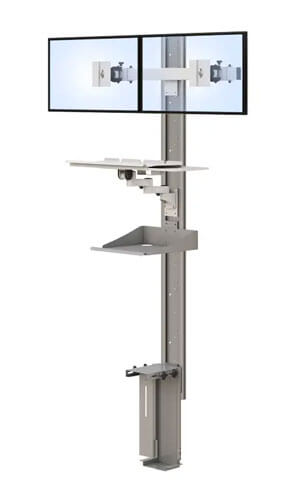
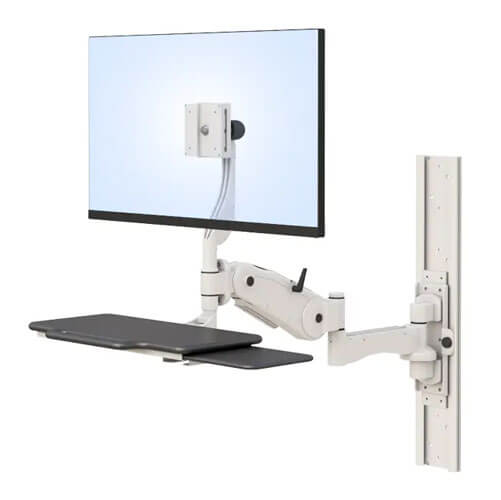
The AFC Computer Monitor Wall Mount Track lists compatibility with VESA 75 and VESA 100 monitor patterns.
3. Will the screen’s shape affect its movement?
A wide, curved, or unusually shaped monitor may fit the mounting plate but still hit a wall, shelf, cabinet, or nearby equipment when moved.
Check the complete monitor dimensions, not just the advertised screen size. Pay attention to the screen’s width, depth, and connector placement. Rear-facing ports may need additional space for plugs and cable bends.
If the monitor has a built-in camera, speakers, or other accessories, include their weight and clearance requirements in the review.
4. Can the wall support the system?
A wall mount transfers the weight of the screen and arm into the building surface. An articulated arm also creates leverage when it extends away from the wall.
The correct mounting method depends on the wall structure, hardware, mount design, and total load. Drywall, wood studs, metal studs, masonry, and other wall types require different installation decisions.
Do not choose anchors or fasteners based on a general online recommendation. Follow the mount manufacturer’s instructions and have the wall reviewed by a qualified installer or appropriate facilities professional.
5. How far must the monitor move?
Think about where the screen needs to be during actual work. Does it need to move closer for detailed viewing? Will it turn toward another person? Does it need to fold against the wall when not in use?
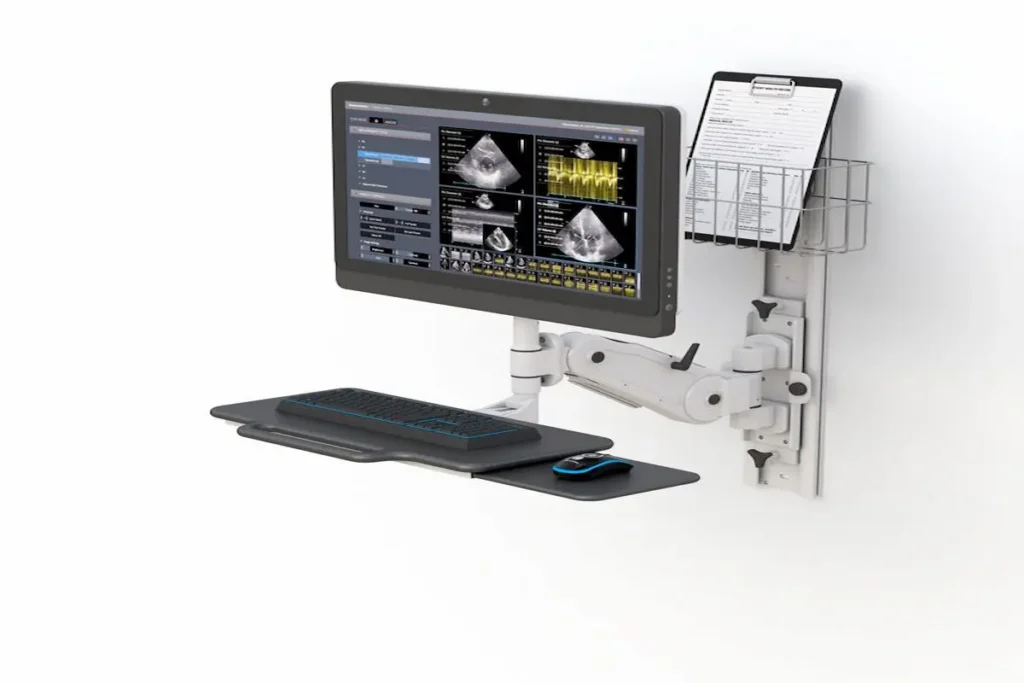
The AFC product page lists a 34-inch fully extended position and a 10-inch depth when retracted and folded toward the wall. It also identifies a 12-inch range of height adjustment, plus a 3-inch adjustment at the monitor bracket.
Buyers should confirm how these measurements are taken and whether optional extension arms change the mount’s capacity or working range.
6. Will it support the user’s viewing position?
There is no single mounting height that suits every person. User height, screen size, corrective lenses, work tasks, and sitting or standing position can all affect placement.
Before drilling into the wall, mark the proposed screen location and ask the intended user to test it. If several people share the station, check whether the available adjustment range works for each of them.
OSHA’s monitor-positioning guidance recommends considering viewing distance, viewing angle, and the monitor’s relationship to the keyboard, desk, and chair.
A mount can make repositioning easier, but it does not guarantee a comfortable setup. The chair, keyboard, mouse, work surface, and screen still need to work together.
7. Is there enough room for the cables?
Monitor movement can pull, pinch, or disconnect cables if their path is not planned carefully.
Identify every required connection, including power, video, USB, network, and accessory cables. Check where the monitor ports are located and whether plugs have enough clearance behind the screen.
The AFC system includes integrated wire management. Even so, the selected cables must be long enough to support the full movement range without creating loose loops that can catch on the arm or nearby objects.
Which Type of Wall-Mounted Setup Fits Your Workflow?
The phrase “monitor wall mount” can describe several different products. Understanding the differences can prevent a buyer from paying for movement or workstation components that are not needed.
Fixed wall bracket
A fixed bracket holds the monitor close to the wall with little or no movement. It may suit a display that stays at one height and faces one direction.
This is often the simplest option, but it offers limited flexibility when different people use the screen.
Articulating monitor arm
An articulating arm can extend, retract, tilt, or swivel. It may be useful when the screen must move closer to the user, turn toward another person, or fold back when it is not needed.
Check the arm’s complete range carefully. A long advertised reach does not necessarily mean the monitor can move into every desired position.
Wall-track system
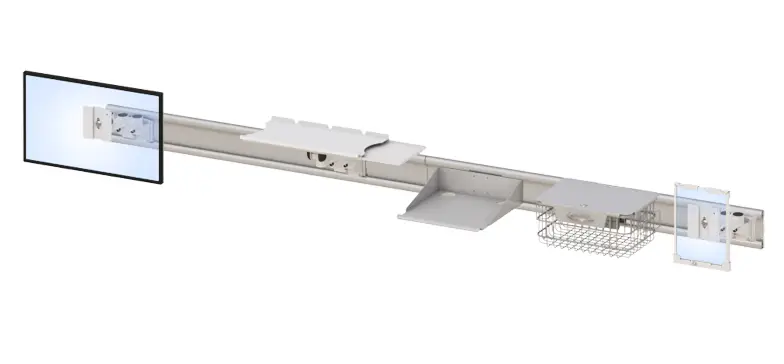
A wall track creates a mounting structure that can support vertical positioning or configurable component placement, depending on the system.
AFC’s specifications describe its featured arm as adjusting vertically on a 30-inch wall track. Buyers should confirm the exact track orientation, monitor capacity, and included components for part number WM30_AFC7808_WB_01.
Complete wall-mounted workstation
A complete workstation goes beyond the monitor. It may also support a keyboard, mouse, computer, scanner, or other equipment.
The AFC configuration lists a folding keyboard tray with a safety lock, an included mouse holder, and integrated cable management. It also supports sitting and standing work positions through its adjustable arm and track.
This type of system may be useful where the entire computer interface needs to fold closer to the wall. If a room already has a suitable desk, however, a monitor-only arm may be the simpler choice.
Buyers comparing alternatives can review AFC’s broader selection of computer wall mounts and wall-mounted workstations.
Where Can a Wall-Mounted Monitor Workstation Make Sense?
A wall-mounted system can be useful when clearing a work surface or maintaining a repeatable equipment location solves a specific problem.
Clinical documentation areas
A wall workstation may keep the computer interface off a crowded work surface while allowing the screen and keyboard to fold closer to the wall.
Healthcare facilities should confirm cleaning instructions, coating documentation, wall requirements, cable routing, and facility policies. AFC describes the product as having an antimicrobial coating, but buyers should request the applicable testing information and approved cleaning agents.
Telehealth consultation rooms
A telehealth room may need a monitor that can move between individual viewing and shared conversation. Screen placement should also account for the camera, lighting, microphones, and patient privacy.
AFC offers additional telehealth workstation products for facilities comparing complete room configurations.
Technical and laboratory workspaces
A technical user may need to bring a screen closer for detailed work and move it aside when the work surface is required for another task.
The facility should verify monitor weight, wall structure, cable lengths, cleaning procedures, and any environmental requirements. A standard monitor wall mount should not be described as cleanroom compatible without supporting documentation.
Control and operations rooms
An adjustable wall mount may help position a reference display or secondary screen in a room where desktop space is limited. The buyer should consider viewing angles, shared sightlines, continuous-use demands, and maintenance access.
For several monitors, request a project-specific review. Do not assume that the featured single-monitor configuration can support multiple displays.
How Should You Plan a Monitor Wall Mount Installation?
A short planning process can uncover most compatibility issues before installation begins.
Step 1: Record the monitor specifications
Write down the manufacturer, model number, weight without the desktop stand, complete dimensions, VESA pattern, and connector locations. Include the weight of attached cameras or accessories.
Step 2: Define the required viewing positions
Identify who will use the monitor and whether they will sit, stand, or share the screen. Mark the preferred viewing positions and note how far the screen must extend, swivel, tilt, or move vertically.
Step 3: Inspect the wall and surrounding space
Have the wall type and structural support reviewed. Check for nearby cabinets, doors, shelves, outlets, equipment, and other objects that could limit the arm’s movement.
Step 4: Match the monitor to the mount
Compare the monitor’s weight and VESA pattern with the confirmed mount specifications. Review reach, retracted depth, height adjustment, tilt, swivel, keyboard placement, and cable capacity.
Step 5: Install and test the complete movement
Arrange installation according to AFC’s instructions and facility requirements. After installation, move the screen through its full range while checking stability, cable tension, clearances, and the position of the keyboard and mouse.
For project-specific help, contact AFC Industries with the monitor model, wall information, room measurements, and required working positions.
Frequently Asked Questions
What should I look for in a monitor wall mount?
Check the monitor’s weight, VESA pattern, dimensions, required movement, cable connections, and intended viewing positions. The wall structure and installation method must also support the complete system.
How do I know whether my monitor is VESA compatible?
Review the monitor manufacturer’s specifications or measure the four mounting holes on the back of the display. The horizontal and vertical spacing must match a pattern supported by the mount.
Can every monitor be mounted on a wall?
No. The monitor needs compatible mounting points, and its weight must fall within the mount’s supported range. Unusual shapes, recessed holes, accessories, or connector locations may require additional review.
How much weight can a monitor wall mount support?
Capacity varies by product and configuration. Check the mount’s documented weight range and include all attached accessories. AFC should confirm the supported load for the exact part number being quoted.
Can a wall mount monitor be adjusted for sitting and standing?
Some wall-mounted systems support enough vertical movement for sitting and standing positions. AFC lists sit-to-stand capability and a 12-inch adjustment range for its featured system. Buyers should confirm that the range fits their users.
What is the difference between a wall bracket and a wall track?
A wall bracket generally attaches a monitor or arm at one fixed mounting location. A wall track can provide a structured path for vertical or configurable component placement, depending on its design.
Does the AFC monitor wall mount include a keyboard tray?
The AFC product page lists a folding keyboard tray with a safety lock and an included mouse holder. Confirm that both components are part of the exact configuration shown in the final quote.
How far does the AFC monitor arm extend?
AFC lists a 34-inch fully extended position and a 10-inch retracted depth. Ask AFC how those measurements were taken and whether optional extension arms affect capacity.
Does a monitor wall mount need professional installation?
Professional installation may be appropriate when structural conditions, heavy equipment, facility policies, or articulated loads are involved. Follow AFC’s installation requirements and have the mounting surface reviewed by a qualified person.
Make Compatibility the First Decision
A monitor wall mount can free work-surface space and create a more adjustable computer station. Its value depends on whether it fits the monitor, wall, room, cables, users, and daily task.
Start with the monitor model and actual room measurements. Then confirm the product’s capacity, movement, included components, wall requirements, and installation instructions.
To review the featured configuration, visit the AFC Computer Monitor Wall Mount Track or request configuration assistance.